TABLE OF CONTENTS
- Product Overview
- Quick Reference
- What's in the Box
- Parts & Features
- Before You Begin
- How to Use Zyron as a Wireless Charger
- Installing Zyron in a Car
- Using Zyron as a Phone Stand
- Charging Output and Adapter Compatibility
- Important Notes
- Care & Safety
- Still stuck?
Product Overview
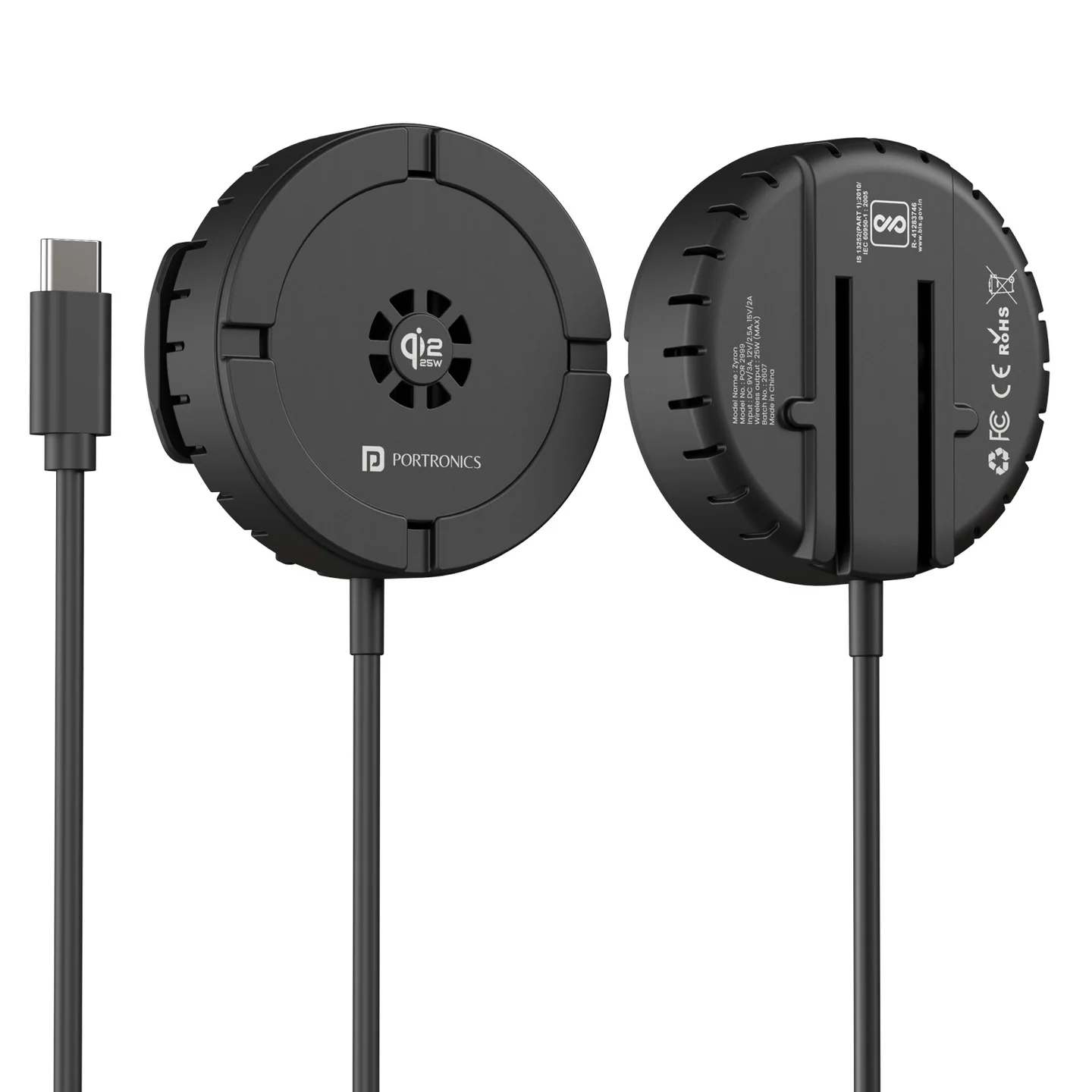
The Portronics Zyron is a magnetic Qi2 wireless charger that can be used as a car air-vent charger or attached to the included phone stand for desk use. It supports wireless charging up to 25W when the phone and power adapter support the required charging standard.
Quick Reference
| Feature | Details |
|---|---|
| Product | Portronics Zyron |
| Product Code | POR 2999 |
| Charger Type | Magnetic wireless charger |
| Wireless Standard | Qi2 certified; compatible with supported Qi wireless-charging phones |
| Maximum Wireless Output | Up to 25W, depending on phone and adapter compatibility |
| Input | USB Type-C |
| Input Ratings | 9V/3A, 12V/2.5A, 15V/2A |
| Cable Length | 1.5 metres |
| Weight | 76.7g |
| Phone Case Recommendation | Less than 4mm thick |
| Power Adapter Recommendation | USB-C PD 30W or higher for optimum performance |
| Use Modes | Car air-vent mount or phone stand |
What's in the Box
| Item | Quantity |
|---|---|
| Zyron Wireless Charger | 1 |
| Universal Air-Vent Clip | 1 |
| Air-Vent Clip Mount | 1 |
| Phone Stand Mount | 1 |
| Type-C Cable | 1 |
Parts & Features
| Part | Function |
|---|---|
| Magnetic Wireless Charging Area | Holds a compatible phone and transfers power wirelessly |
| Type-C Input Cable | Connects the charger to a compatible wall charger or car charging adapter |
| Universal Air-Vent Clip | Secures the mount to a car's air vent |
| Adjustment Nut and Ball Joint | Allows the viewing angle to be adjusted and locked |
| Phone Stand Mount | Lets you use the charger on a desk or table |
Before You Begin
- Confirm that your phone supports Qi wireless charging and magnetic alignment with the charger. The listing is designed for iPhone 12 through iPhone 17 series; charging speed varies by device.
- For optimum performance, use a compatible USB-C PD adapter rated 30W or higher.
- Use a phone case thinner than 4mm for better wireless charging.
- Remove coins, keys, cards, pins and other metal objects from the charging area.
- Check that the cable and charger are undamaged before connecting power.
The charger must be connected to power through its Type-C input to operate.
How to Use Zyron as a Wireless Charger
- Connect the Type-C cable to the charger.
- Connect the other end to a compatible wall adapter or car charging adapter.
- Once connected, the charger enters standby mode.
- Place a compatible phone on the magnetic charging area and align it with the centre of the charger.
- The phone should begin wireless charging automatically.
- Check the phone's charging indicator to confirm that charging has started.
For charging performance up to 25W, both the phone and power adapter must support the required standard. Actual output may be lower depending on compatibility.
Installing Zyron in a Car
- Take the universal air-vent clip and the air-vent clip mount.
- Loosen the adjustment nut on the mount.
- Attach the mount to the air-vent clip.
- Adjust the angle to the desired position, then tighten the nut.
- Slide the wireless charger onto the mount, aligning it with the marking on the charger.
- Secure the complete setup to a suitable car AC air vent.
- Connect the Type-C cable to a compatible car charging adapter.
- Place your phone on the magnetic charging area and check that charging begins.
- For fast charging in the car, use a compatible PD 3.0 car charger.
Safety: Do not install the charger where it blocks your view of the road, covers vehicle controls, or creates an unsafe obstruction. Make sure the mount is firmly secured before driving.
Using Zyron as a Phone Stand
- Take the phone stand mount.
- Slide and attach it to the back of the wireless charger.
- Check that it is fixed properly.
- Place the complete unit on a stable, flat surface.
- Connect the Type-C cable to a suitable charger.
- Place your phone on the magnetic charging area and adjust the viewing angle as needed.
Use the stand on a stable surface where the phone and charger cannot easily fall.
Charging Output and Adapter Compatibility
The listed wireless output levels are 5W, 7.5W, 10W, 15W and 25W. The actual output depends on the phone's supported wireless-charging standard and the power adapter used.
For optimum performance:
- Use a compatible USB-C PD adapter rated 30W or higher.
- In a car, use a compatible PD 3.0 car charger.
- Use a phone case thinner than 4mm.
- Align the phone carefully with the magnetic charging area.
A 25W maximum rating does not mean every phone will charge at 25W.
Important Notes
- Remove coins, keys, cards, pins and other metal objects before charging.
- Do not place metal objects between the phone and the charger.
- Ensure the phone is properly aligned with the wireless charging area.
- Do not use the product on an unstable or shaking surface.
- Keep the charger away from water, moisture and extreme heat.
- Do not charge near flammable substances.
- Do not install the product where it may block driving visibility.
- Do not open, repair or modify the product yourself.
- If the charger becomes unusually hot, disconnect it and let it cool before using it again.
Care & Safety
- Keep the charging surface clean and dry.
- Do not wash the device or expose it to water.
- Avoid knocking, dropping or striking the charger.
- Use only a compatible certified adapter and cable.
- Check that the mount and adjustment nut are firmly secured before each drive.
- Keep the cable routed so it does not interfere with driving controls.
- Do not use the charger if the cable, adapter or mount is visibly damaged.
Still stuck?
If the issue persists after performing all troubleshooting steps, please raise a support request.
Our support team will assist you further.
Support
- Visit: www.portronics.com
- Support Portal: support.portronics.com
Was this article helpful?
That’s Great!
Thank you for your feedback
Sorry! We couldn't be helpful
Thank you for your feedback
Feedback sent
We appreciate your effort and will try to fix the article