TABLE OF CONTENTS
- Product Overview
- Quick Reference
- Controls at a Glance
- Getting Started
- Bluetooth Pairing
- Music Playback and Volume
- Switching to White Noise
- RGB Lighting
- Setting the Clock
- Setting the Alarm
- Sleep Timer
- Wireless Phone Charging
- Charging the Speaker
- Care & Safety
- Still stuck?
Product Overview
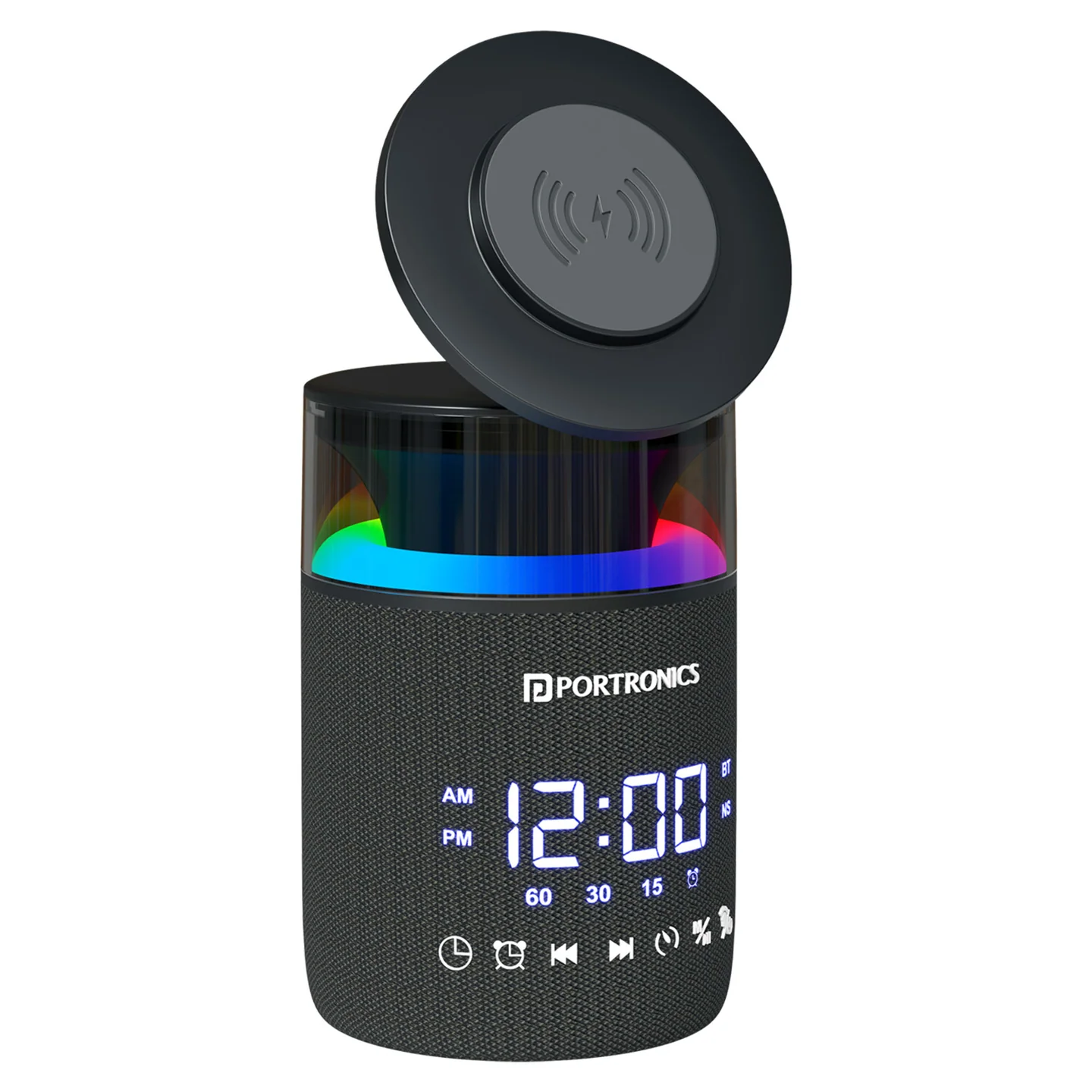
The Portronics Sound Flow 2 combines a Bluetooth speaker, a wireless phone charger, a digital clock with alarm, RGB lighting and white-noise playback in one bedside or desk device.
Quick Reference
| Feature | Details |
|---|---|
| Product | Portronics Sound Flow 2 |
| Bluetooth Device Name | Sound Flow 2 |
| Speaker Output | 5W × 2 |
| Wireless Charging Output | Up to 15W |
| Battery | 3.7V / 1200mAh |
| Charging Input | 5V DC / 500mA |
| Charging Time | Approximately 4 hours |
| Usage Time | Up to 3–4 hours |
| Frequency Response | 50Hz–20kHz |
| Power Adapter for Wireless Charging | Use an adapter rated at least 18W |
Actual playtime and wireless charging performance depend on usage, phone compatibility, adapter and placement.
Controls at a Glance
| Control | Function |
|---|---|
| Power / Lighting control | Press and hold to turn the device on/off; press once to change light effects |
| M button | Press and hold to switch between Bluetooth and White Noise; press once to play/pause |
| Timer / TWS control | Press once to select a 15-, 30- or 60-minute timer; press and hold to activate TWS pairing |
| Previous (⏮) | Press once for previous track/sound or to adjust time; press and hold to lower volume where supported |
| Next (⏭) | Press once for next track/sound or to adjust time; press and hold to raise volume where supported |
| Clock button | Set the time; also used with the controls for clock settings |
| Alarm button | Set or cancel the alarm and adjust display brightness using a long press |
| Digital display | Shows time and status information |
| Wireless charging pad | Charges a compatible phone placed face-up on the pad |
| USB Type-C port | Connects the speaker to its power source for charging and wireless charging operation |
Getting Started
- Place Sound Flow 2 on a stable, flat indoor surface.
- Connect the USB-A end of the charging cable to a suitable power adapter and the USB Type-C end to the device.
- For wireless phone charging, use a power adapter rated at least 18W.
- Fully charge the device before first use.
- Press and hold the Power control to turn the device on.
Sound Flow 2 is intended for indoor use. Keep it away from water, moisture and heat sources.
Bluetooth Pairing
- Turn on Sound Flow 2.
- Press and hold the M button to enter Bluetooth pairing mode, if needed.
- Open Bluetooth settings on your phone, tablet or computer.
- Search for Sound Flow 2 and select it.
- Wait for the connection confirmation tone and status indication.
- Start playing audio on your device.
If pairing does not complete, make sure Sound Flow 2 is in pairing mode and try selecting it again from your device’s Bluetooth list.
Music Playback and Volume
| Action | Control |
|---|---|
| Play / Pause | Press the M button once in Bluetooth mode |
| Next Track | Press the Next (⏭) button once |
| Previous Track | Press the Previous (⏮) button once |
| Volume Up | Press and hold the Next (⏭) button |
| Volume Down | Press and hold the Previous (⏮) button |
Switching to White Noise
- Press and hold the M button to switch from Bluetooth to White Noise mode.
- Press Previous (⏮) or Next (⏭) to browse the available white-noise sounds.
- Select the sound you prefer.
Press and hold the M button again to return to Bluetooth mode.
RGB Lighting
- Press the Power / Lighting control once to switch between lighting effects.
- The RGB lighting is intended for indoor ambient use.
- To turn the device off, press and hold the Power control.
Setting the Clock
- Press the Clock button to enter time-setting mode.
- Use Previous (⏮) and Next (⏭) to adjust the hour and minutes.
- Follow the display prompts and press the Clock button to confirm the setting.
12/24-Hour Display
If your unit offers the 12/24-hour option, use the Clock control to enter time settings and follow the display prompts to switch formats. Check the displayed time after changing the format.
Setting the Alarm
- Press the Alarm button to enter alarm-setting mode.
- Use Previous (⏮) and Next (⏭) to set the hour and minutes.
- Select your preferred alarm sound from the available options.
- Confirm the setting. The alarm icon appears on the display when the alarm is enabled.
- To cancel the alarm, press and hold the Alarm button.
When the alarm rings, press a button to stop it. If it is not turned off, the alarm may enter snooze mode.
Sleep Timer
Press the Timer / TWS control once to cycle through the timer options:
| Display / Setting | Timer |
|---|---|
| 15 minutes | 15 min |
| 30 minutes | 30 min |
| 60 minutes | 60 min |
Watch the display to confirm the selected timer. The timer controls may differ from the alarm settings; use the timer control for the sleep timer.
Wireless Phone Charging
- Make sure the Sound Flow 2 is connected to power.
- Confirm your phone supports Qi-compatible wireless charging.
- Remove the phone case before placing the phone on the charging surface.
- Place the phone face-up and centred on the wireless charging pad.
- Check the phone’s charging indicator.
- If charging does not start, adjust the phone’s position for proper alignment.
Important: Use a power adapter rated at least 18W for wireless charging to work properly. ## TWS Two-Speaker Pairing
TWS allows two compatible Sound Flow 2 speakers to connect for stereo playback.
- Turn on both speakers and keep them close to each other.
- Activate TWS pairing using the Timer / TWS control as supported by the device.
- Wait for the speakers to connect.
- Pair your phone with the speaker as instructed by the Bluetooth pairing steps and play audio.
If the two speakers do not link, turn both off and on again and retry the pairing sequence. Use two Sound Flow 2 units for this feature.
Charging the Speaker
- Connect the provided USB-A-to-Type-C cable to the device.
- Connect the USB-A end to a suitable power adapter.
- Allow approximately 4 hours for charging.
- Disconnect the device when charging is complete.
Use a suitable adapter and keep the device on a stable, ventilated surface while charging. Do not leave it charging unattended or overnight.
Care & Safety
- For indoor use only.
- Keep the device away from water, moisture and direct sunlight.
- Charge on a flat surface away from fabrics and flammable items.
- Use the supplied cable or a certified compatible cable.
- Do not leave the device charging unattended or overnight.
- Do not disassemble or modify the device. Its battery and LED lights are not user-replaceable.
- Stop using the device if it is damaged or heats abnormally.
- Keep metal or magnetic objects, including keys, coins and payment cards, away from the wireless charging pad.
- Maintain at least 20cm between the powered-on device and medical implants that may be affected by magnetic fields, such as pacemakers.
- Keep the device out of reach of young children; it is not a toy.
- Dispose of the product responsibly in accordance with local e-waste rules.
Still stuck?
If the issue persists after performing all troubleshooting steps, please raise a support request.
Our support team will assist you further.
Support
- Visit: www.portronics.com
- Support Portal: support.portronics.com
Was this article helpful?
That’s Great!
Thank you for your feedback
Sorry! We couldn't be helpful
Thank you for your feedback
Feedback sent
We appreciate your effort and will try to fix the article