TABLE OF CONTENTS
- Product Overview
- Quick Reference
- Key Features
- What's in the Box
- Parts & Controls
- Before First Use
- Cookware Selection
- Starting the Cooktop
- Selecting a Cooking Mode
- Adjusting Power or Temperature
- Setting the Timer
- Stopping Cooking
- Suitable Cooking Uses
- Cleaning & Maintenance
- Safety Precautions
- Troubleshooting
- Still stuck?
Product Overview
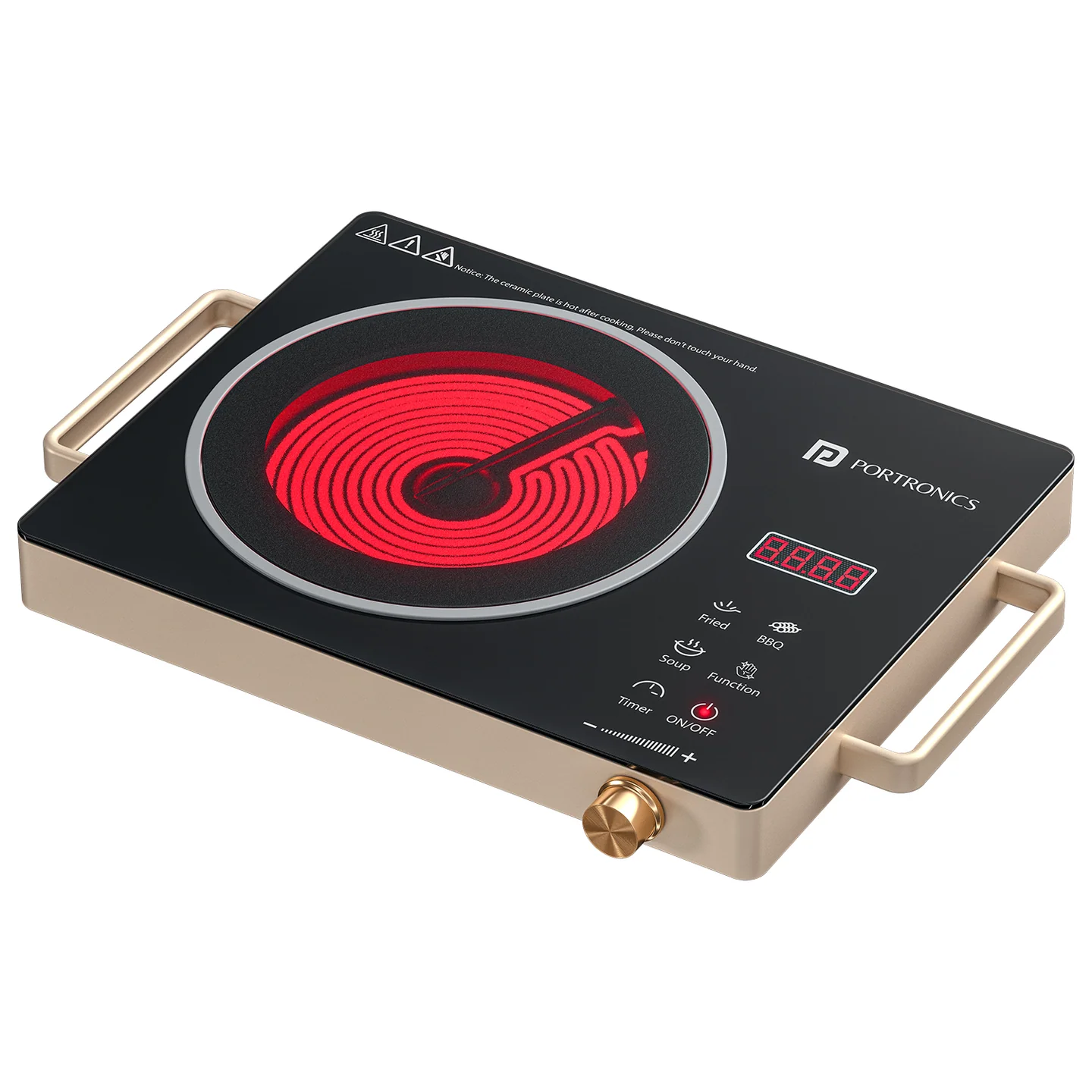
The Portronics Fyron (POR 3645) is a 2200W infrared ceramic cooktop with a digital display and crystal plate. It uses infrared heating to transfer heat to compatible cookware and supports four cooking modes, adjustable power and temperature, and a timer.
The cooktop is designed for a range of cooking tasks, including boiling, steaming, frying, stir-frying, BBQ, soup, tea and milk heating.
Quick Reference
| Feature | Details |
|---|---|
| Product | Portronics Fyron |
| Product Code | POR 3645 |
| Colour | Black |
| Product Type | Infrared Ceramic Cooktop |
| Rated Power | 2200W |
| Input Voltage | 200–240V |
| Frequency | 50/60Hz |
| Input Current / Plug Rating | 10A |
| Heating Surface | Ceramic crystal plate |
| Cooking Modes | Fried, BBQ, Soup and Function |
| Display | Digital |
| Timer Range | 1 minute to 4 hours |
| Temperature Range | 60°C–700°C |
| Power Cable Length | 1.13m |
| Cable Details | 3-core, 1mm² |
| Warranty | 6 months |
Key Features
- Infrared ceramic heating with a crystal plate.
- Four cooking modes: Fried, BBQ, Soup and Function.
- Digital display and multifunction control knob.
- Adjustable power and temperature.
- Timer setting from 1 minute to 4 hours.
- Cookware compatibility across several material types when the base is flat.
- No open flame is used during cooking.
What's in the Box
Cooktop, AC power cable and user documentation. Check the retail package for the exact contents supplied.
Parts & Controls
| Part / Control | Function |
|---|---|
| Ceramic Heating Plate | Transfers heat to the cookware |
| Digital Display | Shows selected cooking mode and settings |
| ON/OFF Button | Starts or stops the cooktop |
| FRIED Button | Starts Fried mode at maximum power; power can be reduced |
| BBQ Button | Starts BBQ mode at the preset high temperature |
| SOUP Button | Starts Soup mode at the preset temperature |
| Function Button | Starts basic cooking mode with adjustable power |
| Timer Button | Sets cooking duration |
| Multifunction Knob | Increases or decreases power, temperature or timer value |
Before First Use
- Place the Fyron on a flat, dry and heat-resistant surface.
- Ensure the ceramic plate is clean and dry.
- Keep paper, cloth, plastic and other flammable items away from the heating plate.
- Choose suitable cookware with a flat bottom.
- Connect the AC power cable to a suitable power socket.
When connected to power, the cooktop beeps once and the indicator turns red to show standby mode.
Cookware Selection
The product supports a range of flat-bottom cookware, including:
- Iron pans.
- Aluminium cookware.
- Copper pans.
- Ceramic cookware.
- Earthenware.
- Heat-resistant Pyrex containers.
Important: For better heating performance and even heat transfer, use cookware with a flat bottom. Avoid cookware with an uneven or curved base because it can reduce heating efficiency.
Starting the Cooktop
- Connect the power cable to a suitable power socket.
- Wait for the standby indication and beep.
- Press the ON/OFF Button to start the Fyron.
- Select the required cooking mode.
- Check the digital display for the selected mode and its default power or temperature setting.
- Adjust the setting with the multifunction knob if required.
Selecting a Cooking Mode
Fyron provides four cooking modes.
1. Fried Mode
- Press the FRIED Button.
- The cooktop starts at maximum power.
- Use the multifunction knob to reduce the power level as required.
This mode is suitable for deep frying.
2. BBQ Mode
- Press the BBQ Button.
- The supplied product sheet states that the mode starts at 550°C.
- The sheet describes temperature adjustment from 600°C to 700°C using the multifunction knob.
The cooktop's stated overall temperature range is 60°C–700°C. Refer to the digital display for the selected temperature.
3. Soup Mode
- Press the SOUP Button.
- The supplied product sheet states that this mode starts at 500°C.
- Temperature adjustment is described as the same as BBQ mode.
- Use the multifunction knob to adjust the setting as required.
4. Function Mode
- Press the Function Button.
- This mode is intended for basic cooking.
- Use the multifunction knob to adjust the power from the minimum to the selected level.
Adjusting Power or Temperature
During manual operation:
- Select the required cooking mode.
- Turn the multifunction knob to increase or decrease the power or temperature.
- Check the digital display to confirm the selected value.
The available adjustment depends on the selected mode.
Setting the Timer
- Press the Timer Button.
- Turn the multifunction knob to set the cooking duration.
- The listed timer range is from 1 minute to 4 hours.
- Check the display to confirm the selected time.
Stopping Cooking
- Press the ON/OFF Button to stop the cooktop.
- Allow the ceramic plate to cool completely before touching or cleaning it.
- Once the unit is cool, disconnect the power plug.
Suitable Cooking Uses
- Boiling.
- Steaming.
- Frying.
- Stir-frying.
- BBQ.
- Soup.
- Tea and milk heating.
- General cooking.
Cleaning & Maintenance
- Switch OFF the cooktop.
- Unplug the power cable.
- Wait until the ceramic plate cools completely.
- Wipe the surface with a soft, damp cloth.
- For stubborn stains, use a mild cleaning liquid and wipe gently.
- Do not use metal scrubbers, sharp objects or harsh chemicals.
- Ensure the unit is dry before storing it.
Do not clean the cooktop directly with water.
Safety Precautions
- Place the Fyron on a flat, dry and heat-resistant surface.
- Do not touch the ceramic heating plate during or immediately after use; it remains hot after cooking.
- Keep the cooktop away from children while hot.
- Do not use cookware with an uneven or curved bottom.
- Do not place paper, plastic, cloth or other flammable items on the heating plate.
- Do not clean the cooktop directly with water.
- Switch OFF and unplug before cleaning.
- Allow the ceramic plate to cool completely before touching, cleaning or storing.
Troubleshooting
| Issue | Possible Cause | Recommended Action |
|---|---|---|
| Cooktop does not start | Power cable is disconnected or unit is in standby | Check the socket and cable, then press ON/OFF |
| Cooktop does not heat evenly | Cookware base is uneven or curved | Use flat-bottom cookware |
| Cooking setting is not changing | Incorrect control used | Select the cooking mode, then adjust the multifunction knob |
| Timer does not change | Timer mode is not selected | Press Timer, then turn the multifunction knob |
| Cooktop stops operating | No cooking mode selected | Select a cooking mode; the unit may enter automatic standby |
| Surface remains hot after switching OFF | Ceramic plate retains heat | Wait until it cools completely before touching or cleaning |
Still stuck?
If the issue persists after performing all troubleshooting steps, please raise a support request.
Our support team will assist you further.
Support
- Visit: www.portronics.com
- Support Portal: support.portronics.com
Was this article helpful?
That’s Great!
Thank you for your feedback
Sorry! We couldn't be helpful
Thank you for your feedback
Feedback sent
We appreciate your effort and will try to fix the article