TABLE OF CONTENTS
- Product Overview
- Quick Reference
- What's in the Box
- Ports & Controls
- Connecting Adapto 200 to Power
- Charging a Device
- Charging Multiple Devices
- Understanding the OLED Display
- Understanding Power Distribution
- Charging Compatibility
- Care & Safety
- Troubleshooting
- Still stuck?
Product Overview
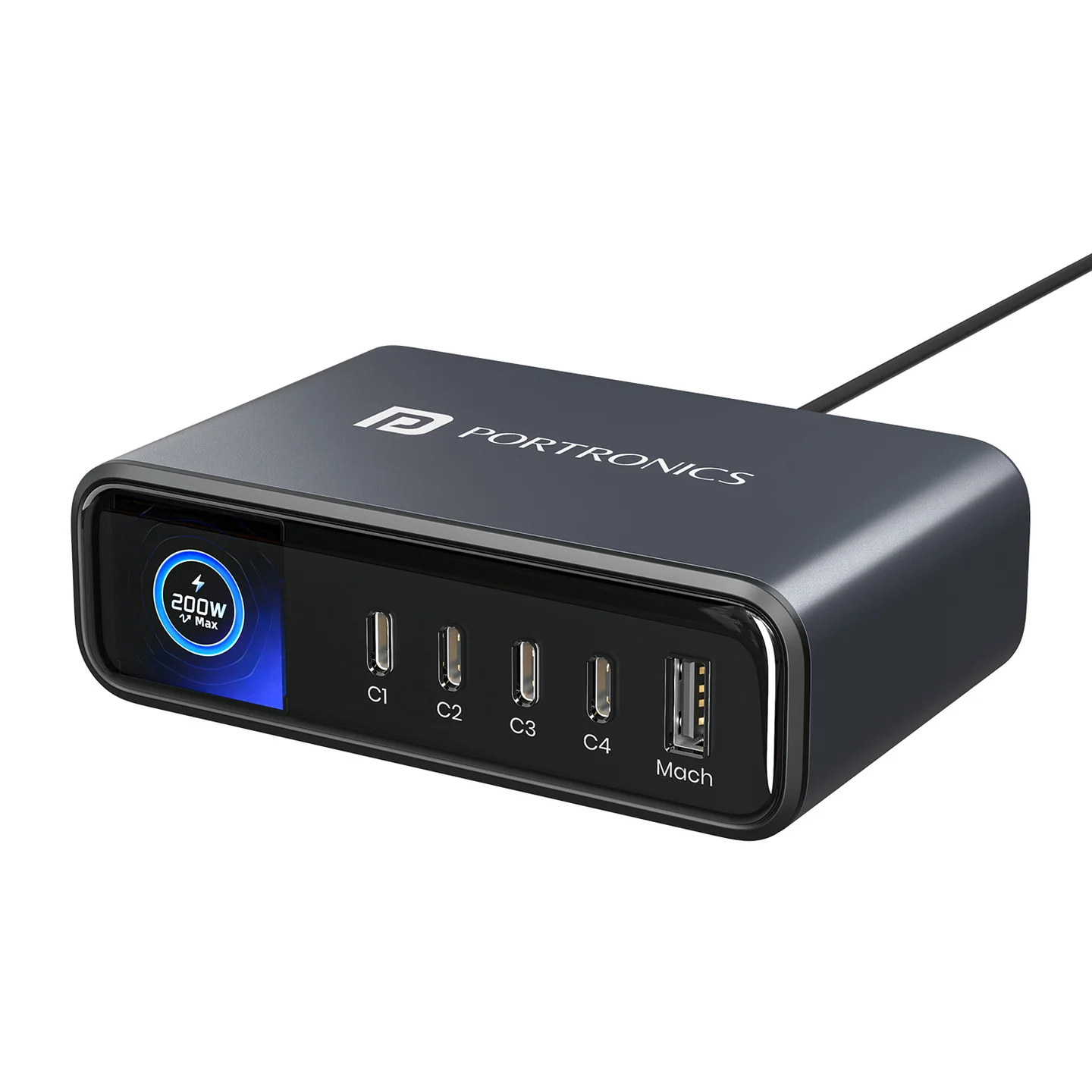
The Portronics Adapto 200 (POR 2957) is a 200W multi-port GaN desktop charger with four USB-C ports and one USB-A port. It is designed to power up to five devices at the same time, including laptops, phones, tablets and other compatible USB-powered devices.
Its smart OLED display shows live power information for individual ports and total output. The display also includes charging-time and temperature-control information.
Quick Reference
| Feature | Details |
|---|---|
| Product | Portronics Adapto 200 |
| Product Code | POR 2957 |
| Colour | Black |
| Product Type | 200W GaN Desktop Power Adapter |
| Total Maximum Output | 200W combined |
| Ports | 4 × USB-C + 1 × USB-A |
| Maximum USB-C Output | Up to 100W per port (subject to power sharing) |
| USB-C Protocols | PD / PPS / QC4 |
| USB-C PD Profiles | 5V/3A, 9V/3A, 12V/3A, 15V/3A, 20V/5A |
| USB-C PPS Range | 3.3–21V / 5A |
| Maximum USB-A Output | Up to 30W |
| USB-A Profiles | 5V/3A, 9V/3A, 12V/2.5A |
| USB-A Protocol | QC 3.0 |
| Input | 110–240V AC, 50/60Hz, 3.6A |
| Display | Real-time OLED display with touch control |
| Technology | GaN |
| Dimensions shown on product sheet | 9.5 × 6.6cm |
Important: The 200W figure is the combined maximum output across the charger. It is not available from every port simultaneously. The actual output per port changes based on which ports are occupied and the connected devices' power requirements.
What's in the Box
| Item | Quantity |
|---|---|
| Adapto 200 Charger | 1 |
| Power Cable | 1 |
| Product Documentation | 1 |
Ports & Controls
The charger has five output ports:
| Port | Type | Maximum Output |
|---|---|---|
| C1 | USB-C | Up to 100W |
| C2 | USB-C | Up to 100W |
| C3 | USB-C | Up to 100W |
| C4 | USB-C | Up to 100W |
| Mach | USB-A | Up to 30W |
Each USB-C port supports PD / PPS / QC4 profiles as specified. The USB-A port supports QC 3.0.
The charger's smart power distribution automatically allocates available power across connected devices, up to the 200W combined limit.
Connecting Adapto 200 to Power
- Place the charger on a stable, dry and well-ventilated surface.
- Connect the supplied power cable to the AC input socket on the charger.
- Connect the other end to a suitable AC wall outlet.
- The OLED display turns on and shows the charger status.
- Connect your devices using compatible USB charging cables.
The input rating is 110–240V AC, 50/60Hz, 3.6A.
Charging a Device
- Identify the required output port.
- Connect a compatible charging cable to the port.
- Connect the other end to the phone, tablet, laptop or other device.
- Check the OLED display for the port's live wattage.
- Allow the charger to automatically allocate power according to the connected device and the available total output.
For best results, use a charging cable rated for the power level and charging protocol required by the device.
Charging Multiple Devices
Adapto 200 supports up to five connected devices at the same time using four USB-C ports and one USB-A port.
- Connect each device to an available port.
- Check the OLED display to see the wattage being delivered by each port.
- Check the total output shown on the display.
- If a device charges more slowly after additional devices are connected, the charger may have redistributed the available power.
Dual-Laptop Charging
The product listing specifically describes dual-laptop charging at 100W + 100W through USB-C2 and USB-C3, within the 200W total output limit.
Use compatible laptops and USB-C cables that support the required power delivery.
Understanding the OLED Display
The real-time OLED display provides information about charger operation.
The supplied product sheet illustrates these display views:
| Display View | Information |
|---|---|
| Standby Mode | Charger standby status |
| Total Wattage Display | Combined output power being used |
| Port Wattage Display | Power being delivered through each USB output |
| Charging-Time Calculation | Charging time information |
| Temperature Control Display | AI temperature-control / ECO-COOL status |
The touch sensor is used to change the display view. Use the touch control to cycle through the available display screens.
The displayed wattage can change as devices connect, disconnect or change their charging demand.
Understanding Power Distribution
The charger has a 200W combined output limit. Power distribution changes according to the occupied ports and connected devices.
The product sheet lists the following example combinations:
| Connected Ports | Power Distribution Printed on Product Sheet |
|---|---|
| C1 + C2 | 65W + 35W |
| C3 + C4 | 65W + 35W |
| C1 + C2 + C3/C4 | 65W + 35W + 100W |
| C1 + C2 + C3 + C4 | 65W + 35W + 65W + 35W |
| C2 + C3 | 100W + 100W |
| C3 + USB-A | 65W + 30W |
| C4 + USB-A | 15W + 10W |
| C1/C2 + USB-A | 100W + 30W |
Power-table note: The printed combination table contains some entries that are not fully clear or appear inconsistent with the individual port ratings and 200W total. Treat the OLED display's live port readings and total output as the operating reference. Do not assume that every listed combination is guaranteed for every device or cable.
Charging Compatibility
Adapto 200 is designed for compatible USB-C PD / PPS / QC4 and USB-A QC 3.0 devices.
Examples of supported device categories include:
- USB-C laptops and notebooks.
- Smartphones.
- Tablets.
- Other compatible USB-powered devices.
The actual charging speed depends on the connected device, cable, charging protocol and available power allocation.
Care & Safety
- Do not place or store the charger in high-temperature environments, intense sunlight or near fire.
- Do not use the charger if it has dents, punctures, tears, deformation, corrosion or other visible damage.
- Stop using the product immediately if it emits smoke, sparks, unusual odours or abnormal heat.
- Do not disassemble, repair or modify the charger.
- Do not expose the charger to moisture or immerse it in liquid.
- Keep the product dry and use it in a suitable indoor environment.
- Use the supplied power cable and a properly rated wall outlet.
- Keep the charger away from small children.
Troubleshooting
| Issue | Possible Cause | Recommended Action |
|---|---|---|
| OLED display does not turn ON | AC cable is loose or outlet has no power | Check the cable connection and wall outlet |
| Device is not charging | Charging cable or port connection is loose | Reconnect both ends and try a compatible cable |
| Charging speed is lower than expected | Power is shared across ports or device/cable does not support higher power | Check the OLED port wattage and use a suitable cable |
| Laptop is not receiving 100W | Laptop, cable or port combination may not support 100W | Confirm device support and check the displayed wattage |
| Total output changes when another device is connected | Smart power distribution has reallocated power | Check the live port readings on the OLED display |
| OLED display view does not change | Touch input may not have registered | Tap the display touch sensor again |
| Charger becomes unusually hot or emits an odour | Possible fault or unsuitable operating conditions | Disconnect power and stop using the product |
Still stuck?
If the issue persists after performing all troubleshooting steps, please raise a support request.
Our support team will assist you further.
Support
- Visit: www.portronics.com
- Support Portal: support.portronics.com
Was this article helpful?
That’s Great!
Thank you for your feedback
Sorry! We couldn't be helpful
Thank you for your feedback
Feedback sent
We appreciate your effort and will try to fix the article