TABLE OF CONTENTS
- Product Overview
- Quick Reference
- What's in the Box
- Parts & Controls
- How to Wear Aero Tune
- Power ON / OFF
- Bluetooth Pairing
- Indoor / Outdoor Sound Modes
- Music Controls
- Calls
- Voice Command
- Battery-Level Voice Notification
- Charging
- Playtime
- Care & Safety
- Still stuck?
Product Overview
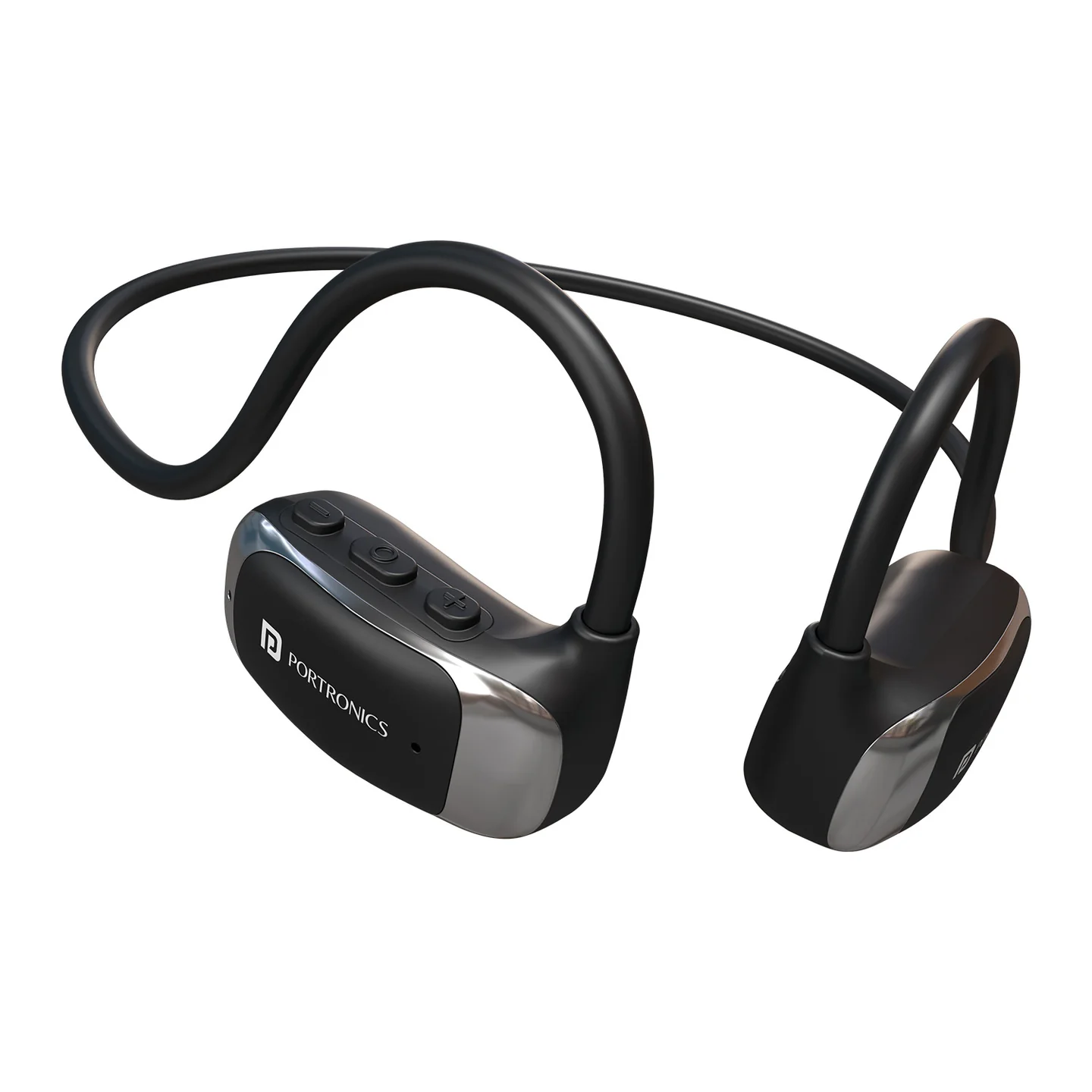
The Portronics Aero Tune is an open-ear wireless stereo headset designed for comfortable listening while remaining aware of nearby sounds. It includes an in-built microphone, indoor/outdoor sound modes, USB Type-C charging and an adjustable silicone strap for a more secure fit.
Quick Reference
| Feature | Details |
|---|---|
| Product | Portronics Aero Tune |
| Product Code | POR 2558 |
| Design | Open-ear wireless headset |
| Bluetooth | 6.0 |
| Bluetooth Range | Approximately 10 metres |
| Driver | 16mm dynamic driver |
| Playtime | Up to 10 hours at 80% volume |
| Charging Port | USB Type-C |
| Charging Input | 5V / 1A |
| Charging Time | Approx. 2 hours |
| Water Resistance | IPX5, according to the product listing |
| Microphone | Built-in |
| Sound Modes | Indoor and Outdoor |
What's in the Box
| Item | Quantity |
|---|---|
| Aero Tune Headset | 1 |
| Charging Cable | 1 |
| Silicone Strap | 1 |
| User Manual | 1 |
Parts & Controls
| Part / Control | Function |
|---|---|
| MFB (Multi-Function Button) | Power, calls, playback and voice-command controls |
| Button + | Volume up / track control |
| Button − | Volume down / track control |
| Type-C Charging Port | Charges the headset |
| Silicone Strap | Helps secure the headset for a smaller head circumference |
How to Wear Aero Tune
- Place the open-ear headset around your ears, with the speakers positioned near the ears rather than inside the ear canal.
- Adjust the headset so it sits comfortably and securely.
- If you need a tighter fit, use the included silicone strap.
- Attach each end of the strap to the headset band behind the ears.
- Adjust the strap by loosening or tightening it until the fit feels secure.
Do not bend, twist or pull the headset forcefully.
Power ON / OFF
- Power ON: Press and hold the MFB for about 3 seconds. The white LED flashes.
- Power OFF: Press and hold the MFB for about 3 seconds. The green LED flashes.
Bluetooth Pairing
- Power on Aero Tune.
- Open Bluetooth settings on your phone or other audio device.
- Search for Aero Tune.
- Select Aero Tune to connect.
- Once connected, start playing audio.
Keep the phone within approximately 10 metres for a stable connection.
Indoor / Outdoor Sound Modes
Aero Tune has two sound modes.
- Quickly triple-click the MFB to switch between Indoor Mode and Outdoor Mode.
- Listen for the mode prompt to confirm the selected mode.
Choose the mode that best suits your listening environment.
Music Controls
| Action | Control |
|---|---|
| Play / Pause | Click the MFB once |
| Volume Up | Click Button + once |
| Volume Down | Click Button − once |
| Previous Track | Press and hold Button + |
| Next Track | Press and hold Button − |
Calls
| Action | Control |
|---|---|
| Answer a call | Click the MFB once |
| End a call | Click the MFB once |
| Reject an incoming call | Double-click the MFB |
The headset has an in-built microphone for calls.
Voice Command
Quickly click the MFB four times to activate the voice-command function. Voice-assistant availability depends on the connected phone and its settings.
Battery-Level Voice Notification
When the headset powers on, it announces the approximate battery level:
| Battery Level | Voice Prompt |
|---|---|
| 100%–70% | Battery high |
| 69%–40% | Battery medium |
| 39%–10% | Battery low |
Recharge the headset when a low-battery prompt is heard.
Charging
- Connect the supplied Type-C cable to the headset.
- Connect it to a suitable 5V/1A adapter.
- Check the LED indicator.
- Allow approximately 2 hours for charging.
Charging Indicator
| LED | Meaning |
|---|---|
| Green LED on | Charging |
| White LED on | Fully charged |
Use a certified adapter and the supplied charging cable. Do not charge or operate the headset when it is wet or in humid conditions.
Playtime
The manual specifies up to 10 hours of playtime. This is measured at 80% volume. Actual playtime varies with volume, sound mode, calls and usage conditions.
Care & Safety
- Listen at a moderate volume to help prevent hearing damage.
- Stay alert to your surroundings while walking, cycling or driving.
- Do not operate the headset while wet or in humid conditions.
- Use only certified 5V adapters and the supplied charging cable.
- Keep the headset away from extreme heat, fire and direct sunlight.
- Avoid bending, twisting or dropping the headset.
- Clean gently with a soft, dry cloth.
- Do not submerge the headset in water.
- Keep it away from strong magnetic or electromagnetic fields.
- Discontinue use if you experience pain, irritation or dizziness.
- Keep out of reach of children and pets.
Still stuck?
If the issue persists after performing all troubleshooting steps, please raise a support request.
Our support team will assist you further.
Support
- Visit: www.portronics.com
- Support Portal: support.portronics.com
Was this article helpful?
That’s Great!
Thank you for your feedback
Sorry! We couldn't be helpful
Thank you for your feedback
Feedback sent
We appreciate your effort and will try to fix the article